
Frame the card
Hold one card in even light, with the printed number visible. Manual entry is available too.
Identify your One Piece TCG cards, check available prices, and save the exact printing to your collection.

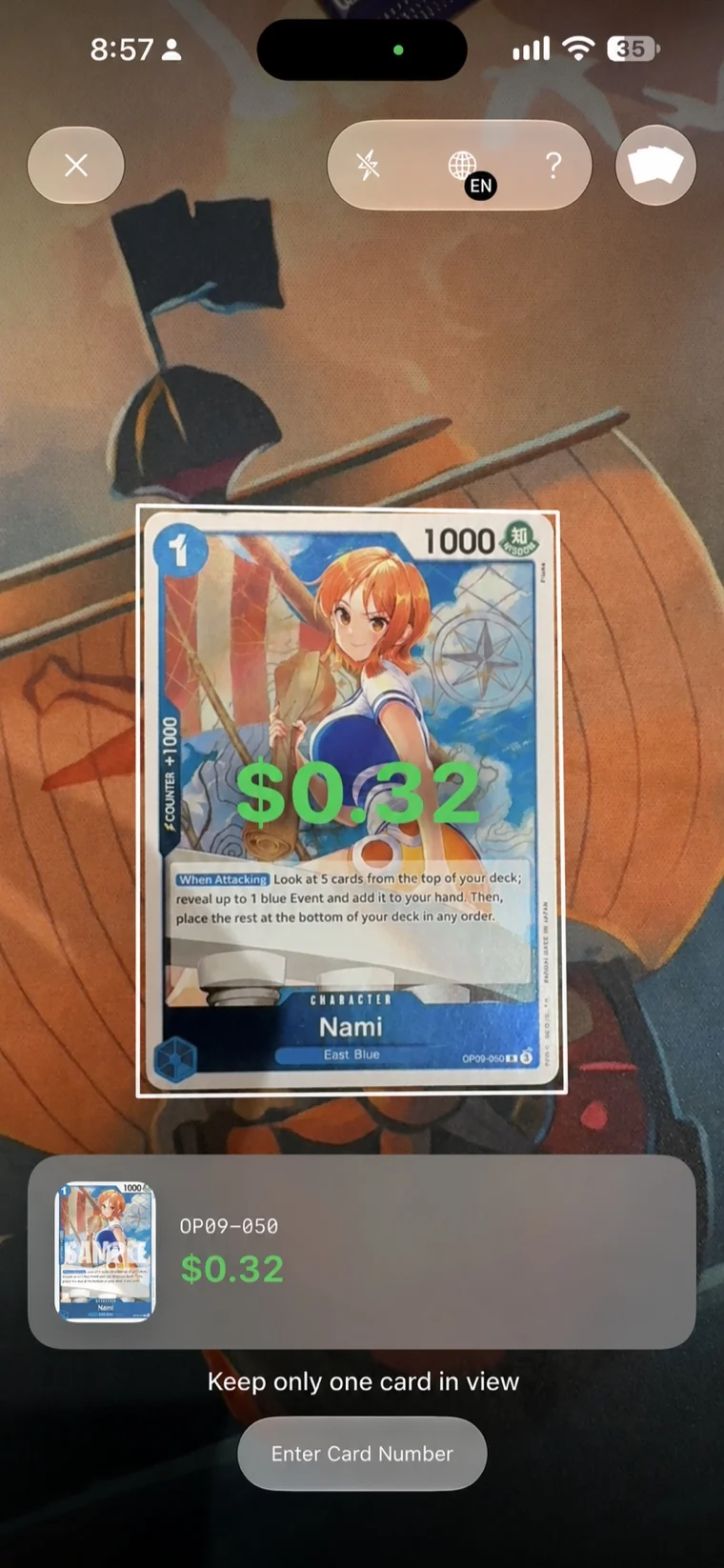
Hold one card in even light, with the printed number visible. Manual entry is available too.
Compare the artwork and language. When several versions share a number, choose the one you own.
See available price information and add the confirmed printing to your collection.
Follow our card identification guide to compare language, artwork, and rarity before saving a scan. Learn how to interpret a card value once you have matched the printing.
Umi is built for iPhone. There is no Android version at the moment. The web catalog works in your browser; scanning and collection features live in the iOS app.
Yes. You can browse and scan English and Japanese One Piece TCG cards. Choose the matching card language in the app. Language and artwork variants are kept separate, and price coverage varies by printing.
Open Scan, allow camera access, and hold one card inside the frame with its printed number visible. Umi reads the number and finds matching printings. Confirm the artwork and language, then save the card to your collection.
Use even lighting, reduce glare, and hold the phone steady. Make sure the printed card number is in focus and the correct language is selected. Try removing a reflective sleeve. You can also enter the card number manually. If lookup fails, check your connection and retry.
Downloaded catalog metadata can be browsed offline. New artwork, current price information, scanner confirmation, purchases, and iCloud sync need an internet connection. Previously cached images or values may remain visible, but can be out of date.
Not yet. Graded-card pricing is coming soon, with no release date announced. Current price references are not grading estimates, appraisals, or guaranteed sale prices.
A card number can belong to several printings. When that happens, Umi asks you to choose the matching version. Compare the artwork, language, and variant before saving. Scanning does not authenticate cards or assess their condition.
Open a card in the app and save it to your collection. Umi keeps track of your saved printings and quantities. Pro adds more collections and Batch Scan, so you can review a stack of scanned cards before saving it.
Free access includes three accepted scans per day, one named collection, and up to 70 saved card copies. Umi Pro adds features including Batch Scan, more collections, unlimited saved cards, and available price history. See the app for current subscription prices and terms.
Collections use your private iCloud account when iCloud is enabled and available. Use the same Apple account on your devices and allow time for sync. Network access, available iCloud storage, and Apple's services affect when changes appear.
Use Restore Purchases in Umi with the Apple account that made the purchase. To cancel, open iPhone Settings, tap your name, then Subscriptions and select Umi. Deleting the app does not cancel a subscription. Our Terms of Use explain purchases and renewals.
Use Delete All Data in Umi Settings to remove saved cards and collections. Deletions sync through iCloud when connectivity allows. This does not cancel a subscription or clear every preference and cache. See our Privacy Policy for details.
No. Umi is an independent collector app, not affiliated with or endorsed by Bandai, Shueisha, Toei Animation, Eiichiro Oda, or the One Piece rights holders. Card artwork and trademarks belong to their owners. Read the Terms of Use.